

Best Practices for Converting Raw JSON Data into a Spreadsheet

We all know that raw data rarely arrives in a ready-to-use format. When it comes to JSON, things can quickly become messy, deeply nested, and difficult to interpret for professionals and businesses.
This is where the need to convert raw JSON into editable and manageable spreadsheets becomes essential. By transforming complex hierarchical data into a tabular format, professionals can ensure easier analysis and quick decision-making.
While conversion may seem like a basic task, it can turn into a frustrating and disappointing experience if the right approach is not followed. That’s why learning about the best practices to efficiently handle the conversion process is essential for anyone dealing with modern data pipelines.
Useful Practices for Transforming Raw JSON Data into Excel
Here are a few essential practices that will help efficiently convert raw JSON data into an editable spreadsheet.
- Always Prepare JSON Data Before Conversion
When it comes to converting JSON data into a spreadsheet, preparation is a must. There are several reasons: raw data is often inconsistent, incomplete, and unnecessarily difficult to interpret.
Effective data preparation beforehand can help fix these. Now the question is: how to do so? First of all, you should validate the structure of JSON to make sure it is properly formatted and free from syntax errors, such as:
- Missing brackets
- Missing or misplaced commas
- Incorrect nesting
There are a range of JSON validators available online that will help scan and verify JSON data in just a few clicks.
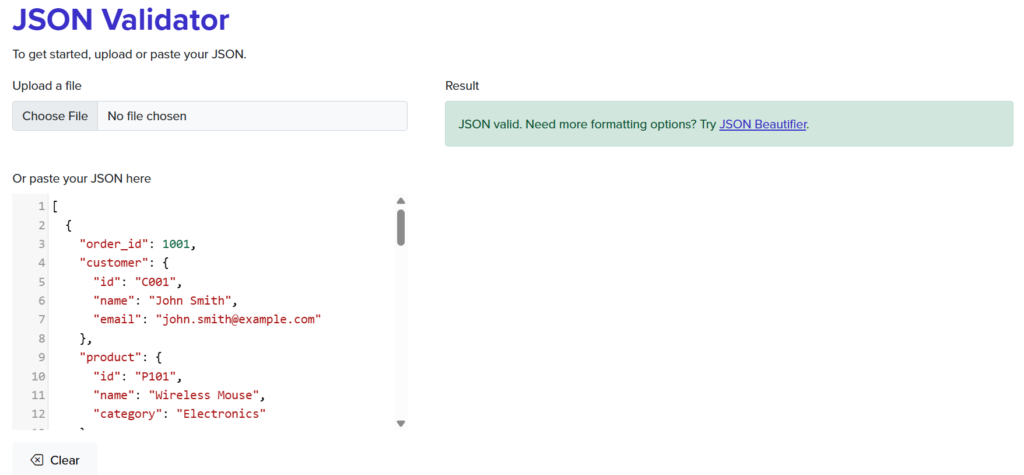
Source: https://csvjson.com/json_validator
When done, carefully review the entire dataset to find and remove irrelevant fields that aren’t required.
Many APIs return additional metadata and system-generated values that can clutter your spreadsheet. So, eliminating them beforehand helps keep your final Excel file clean and focused.
- Flatten Nested JSON Structures

Raw JSON data is usually hierarchical, containing nested objects and arrays. While this structure proves useful for developers, it is not suitable for spreadsheets, because these consist of flat rows and columns.
That’s why flattening nested JSON data is considered a useful practice. Converting Raw JSON Data into a Spreadsheet. It is the process of transforming hierarchical structures, nested objects, or arrays into a single-level object. For instance, instead of storing a user’s city within the “Address” object, the flattened version can represent it as an “Address_City.”
Remember, not all nested structures flatten the same way. Arrays of objects should be expanded into separate rows. Nested objects, on the other hand, should be split into additional columns. If you treat both the same way, then this can lead to data loss or unreadable rows. So, it is essential to identify which type you are dealing with before flattening begins.
Implementing this approach on the entire data will help reduce its structural complexity and also ensure it stays organized and consistent before the actual conversion process begins. Apart from this, proper flattening of nested data significantly reduces the risk of:
- Missing information
- Duplicate entries
- Poor formatting
- Use Automated Conversion Approach
There are two approaches to transform JSON data into a spreadsheet. One is manual, and the other is automated. You should avoid going with the manual approach even if you plan to convert small datasets. This is because it has multiple issues.
- It takes valuable time and effort
- It is error-prone
That’s why going with the automated approach is recommended. It involves using a dedicated JSON-to-Excel converter, which you can easily find online.
These tools work by analyzing JSON data and then arranging it into appropriate rows and columns within a spreadsheet. A picture of one such converter is attached below for a better understanding.
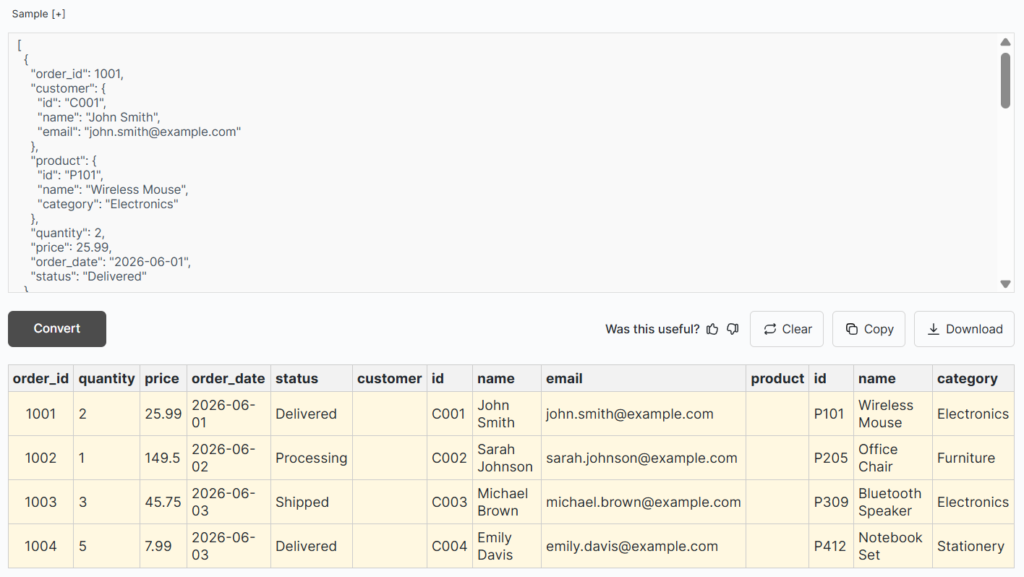
Source: https://www.minifier.org/json-to-excel
As you can see, the spreadsheet is clear, well-formatted, and organized. An option to copy or download the Excel file is provided by the tool.
In short, relying on a dedicated JSON to Excel converter will save not only time and effort, but it will also help ensure maximum accuracy.
- Map JSON Fields in Spreadsheet Columns
Field mapping is the process of defining how each JSON key will correspond to a column in your Excel sheet. This is a very important practice, as it plays a pivotal role in determining how readable and useful your final dataset will be.
Start by identifying the core fields that are important for your data analysis.
These can include:
- IDs
- Names
- Quantities
- Values
- Categories
These may vary depending on the type of your JSON data.
Next, assign each field a clear and relevant column name. Do not use overly technical or ambiguous words that may confuse you later. Additionally, it is essential to maintain consistency across different records.
For example, if one JSON object uses “User_name” and the other uses “Username,” they should be standardized into a single column name in the spreadsheet.
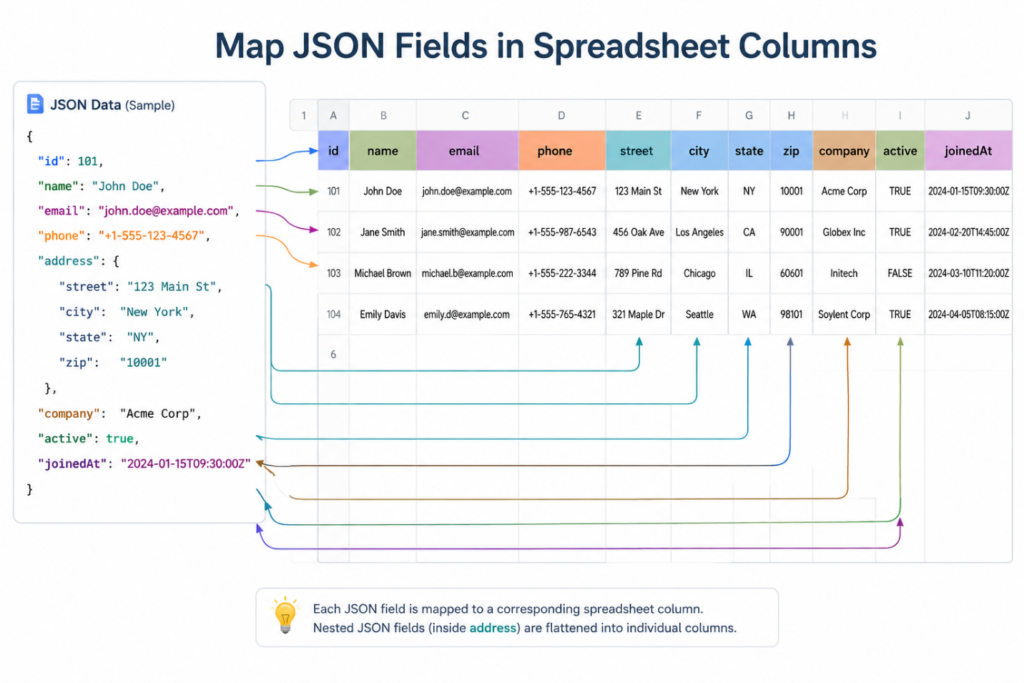
Remember, inconsistent mapping can lead to fragmented or duplicated columns.
- Validate Data After Conversion
When you are done with the conversion, it is important to verify the converted spreadsheet data. Doing so will help you ensure whether it is 100% accurate or not. This is crucial because even a small mistake can impact the overall analysis and reporting process.
Here is an effective approach for performing validation.
- Compare the raw JSON data with spreadsheet output
- Make sure all the rows and columns are perfectly mapped
- Review random samples of data
- Utilize Excel filters to quickly spot missing values
This way, you can make sure that no data is lost or misinterpreted during the conversion process.
So, these are a few best practices that will help professionals convert raw JSON data into spreadsheets effectively.
Wrapping It Up
Data professionals and businesses often convert raw JSON data into an Excel sheet for quick editing, analysis, organization, and management. Although performing the conversion process seems easier, it can become challenging if the data is inconsistent and complex.
However, this won’t be the case if best practices are followed. These include preparing the JSON data beforehand, flattening nested structures, automating the conversion, and mapping fields in a spreadsheet. In this blog post, we have covered all these in complete detail; hopefully you will find them valuable!
Frequently Asked Questions (FAQs)
Why is there a need to convert raw JSON data into a spreadsheet?
Well, raw JSON data is often complex, inconsistent, and nested. This makes it difficult for professionals to analyze it properly. However, when it is transformed into an Excel sheet, the structured rows and columns make it easier to read, filter, and analyze data.
What is the major issue professionals face when performing the conversion process?
When converting raw JSON data into Excel, the major challenge is handling nested structures and arrays. Professionals need to flatten these properly (following the aforementioned approach) without losing their relationships or creating duplicate records.
What is meant by flattening JSON data?
It refers to the process of converting nested objects and hierarchical structures into a single-level format with rows and columns. For instance, a nested “Address” object can be converted into separate columns such as “Address_City” or “Address_Country.”
