

How to Develop MERN Full-Stack Applications in 2026?
Discover how to build standout MERN full-stack applications in 2026 by mastering backend and frontend architecture and effective development strategies.
The Architecture of the MERN Stack
The MERN stack represents a sophisticated collection of technologies designed to facilitate the creation of scalable and high-performance web applications. It is defined by its four core components: MongoDB, Express.js, React.js, and Node.js.
MongoDB
This component serves as the data persistence layer. It is a NoSQL database that utilises a document-orientated model, storing data in flexible, JSON-like structures. This flexibility allows for the evolution of data schemas without the rigid constraints typical of traditional relational databases.
Express.js
Acting as the web application framework for the back-end, Express.js operates within the Node.js environment. Its primary function is to simplify the development process of server-side logic and the construction of robust application programming interfaces (APIs).
React.js
This is a front-end JavaScript library specifically engineered for the creation of user interfaces. It is particularly effective for developing single-page applications where a seamless and dynamic user experience is paramount.
Node.js
As a back-end JavaScript runtime, Node.js enables the execution of JavaScript on the server side. This allows developers to utilise a single programming language across the entire development stack, enhancing consistency and efficiency.
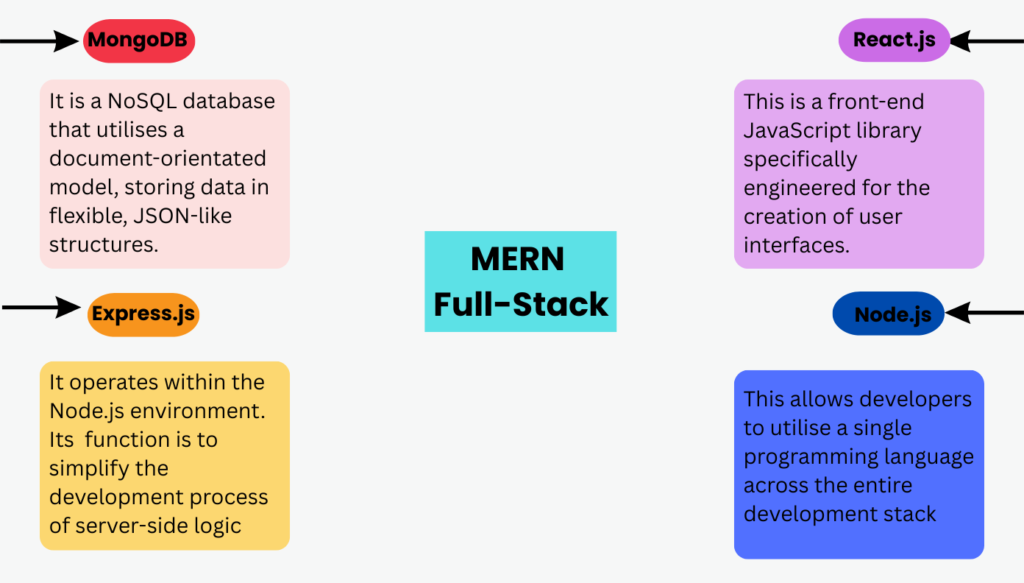
The integration of these four technologies establishes a unified full-stack development framework. Because every layer of the stack utilises JavaScript, development teams can achieve higher levels of productivity and operational efficiency by maintaining a consistent codebase.
Pre-Development Requirements and Environment Configuration
The successful initiation of a MERN project necessitates a properly configured development environment:
- Node.js Installation: The installation of Node.js is the foundational step, as it provides the runtime environment for the back-end and includes the Node Package Manager (npm) for managing project dependencies.
- MongoDB Setup: Data management requires either a local installation of MongoDB or the utilisation of MongoDB Atlas, which is a cloud-based database service.
- Development Tools: The use of a sophisticated code editor, such as Visual Studio Code or Sublime Text, is recommended for efficient coding. Additionally, Postman is identified as an essential tool for the testing and verification of API endpoints.
Technical Implementation:
The Back-End Infrastructure
The construction of a MERN application begins with the establishment of the back-end server. Using a “To-Do” application as a functional example, the development process follows a structured sequence:
1. Project Initialization and Dependency Management
A dedicated project directory, mern-todo-app, must be created. The initialisation of the project via npm init -y generates a package.json file, which tracks the necessary libraries. Four specific packages are required for the back-end:
- Express: To provide the web framework architecture.
- Mongoose: To serve as an Object Data Modelling (ODM) library, facilitating the interaction between the application and the MongoDB database.
- CORS (Cross-Origin Resource Sharing): To allow the back-end to accept requests from a different origin, specifically the React front-end.
- Body-Parser: To process and parse the data contained in the bodies of incoming HTTP requests.
2. Server Configuration and Middleware
The core logic of the back end resides in a file named server.js. This file initialises an Express application and defines the port (typically port 5000) on which the server will listen for incoming traffic. Middleware functions, including cors() and bodyParser.json(), are integrated into the application pipeline to handle security and data parsing.
3. Database Connectivity and Data Modeling
Connection to the database is established using the mongoose.connect() method, targeting a local or cloud-based MongoDB URI. Once connected, a schema is defined to dictate the structure of the data. In the provided example, a todoSchema is created containing:
- task: A string representing the task description.
- completed: A boolean value, defaulting to false, to track the status of the task.
A model named Todo is then instantiated based on this schema, providing the interface for performing database operations.
4. API Route Development
The server exposes specific endpoints to facilitate CRUD (Create, Read, Update, Delete) operations:
- GET /todos: This route utilises asynchronous logic to retrieve all entries from the database using Todo.find() and returns them in JSON format.
- POST /todos: This endpoint accepts a new task from the request body and saves it to the database via newTodo. save(), and returns the newly created object with a 201 status code.
- DELETE /todos/:id: This route identifies a specific task by its unique ID and removes it from the collection using Todo. findByIdAndDelete().
The Front-End Architecture
The front end of the application is constructed using React.js, typically located within a client subdirectory of the main project.
1. React Environment Setup
The front end is bootstrapped using the npx create-react-app command. To facilitate communication with the back-end API, the Axios library is installed, which simplifies the process of making HTTP requests.
2. Component Logic and State Management
The primary interface is managed by a TodoApp.js component. This component utilises React Hooks to manage application logic:
- useState: This hook maintains the state of the list of tasks (todos) and the current input text for a new task (task).
- useEffect: This hook triggers a data-fetching function, fetchTodos, immediately upon the component’s initial render (mounting), ensuring the user sees the most current list of tasks.
3. API Integration and Interaction
The TodoApp component contains specific functions to interact with the back-end:
- fetchTodos: Executes an axios. get request to the server’s /todos endpoint.
- addTodo: Prevents the default form submission behaviour, constructs a task object, and sends an axios. post request to save the new task. The state is then updated to include the new task without requiring a page reload.
- deleteTodo: Sends an axios. Delete the request to the server using the task’s unique ID and update the local state to filter out the removed item.
4. User Interface Structure
The component renders a user interface consisting of a heading, a form for inputting new tasks, and an unordered list. The todos.map() function is employed to iterate through the task array and render each item dynamically, complete with a button to trigger the deletion logic. This component is integrated into the root of the application via App.js.
Execution and Operational Procedures
To bring the full-stack application online, a dual-process execution is required:
- Back-End Initialisation: The MongoDB server must be active, after which the command node server. js is executed in the project root to start the API.
- Front-End Initialisation: In a separate terminal, the command npm start is executed within the client directory.
Upon successful execution, the application becomes accessible via a web browser, typically at http://localhost:3000, where the React front-end communicates with the Express server running on port 5000.
Strategic Best Practices for MERN Development
Several industry-standard practices to ensure the long-term viability and performance of MERN applications:
- Logical Folder Structure: Maintaining a clear separation between client-side and server-side code is vital for project organisation and team collaboration.
- Robust Error Handling: Implementation of error-catching mechanisms on both the server (to prevent crashes) and the client (to provide user feedback) is essential for a professional user experience.
- Security and Configuration: Sensitive data, such as database credentials and connection strings, should be managed securely through the use of environment variables rather than being hard-coded.
- Performance Optimisation: Techniques such as lazy loading should be utilised within React to ensure fast load times and responsive interfaces.
- Quality Assurance: The development of unit tests for both front-end components and back-end logic is necessary to maintain code integrity and robustness.
Extended Professional Context
To learn how to practically install the above front-end and back-end architectures, which are usually developed by a MERN stack developer, enrol in the full-stack developer course in Hyderabad by WhiteScholars.
The MERN full-stack developer course in Hyderabad covers a wide range of advanced topics relevant to modern full-stack development, including:
- Automation and Quality: Techniques for enterprise-level GitHub automation and the use of automated review systems to improve code quality.
- Advanced JavaScript: In-depth explorations of JavaScript hoisting, execution contexts, and the nuances of using Axios in production environments (including retries and timeouts).
- Cloud and Infrastructure: The critical role of cloud hosting in modern deployment and the essential cloud computing knowledge required for full-stack developers.
- CSS Evolution: The transition from basic selectors to utility-first frameworks in modern web design.
Conclusion
The MERN stack is an essential set of tools designed for creating modern web applications that are both scalable and high-performing. By understanding how MongoDB, Express.js, React.js, and Node.js work together, developers can build complex full-stack applications using just JavaScript.
This unified approach simplifies the development process and allows for seamless integration between the front-end and back-end. As developers progress from creating simple applications that perform basic CRUD (Create, Read, Update, Delete) operations to building intricate systems for large enterprises, they must consistently apply best practices.
This includes optimising performance and incorporating advanced features, such as secure user authentication and deploying applications in the cloud. By doing so, they ensure that their applications are not only functional but also robust and ready for real-world challenges.
Frequently Asked Questions
1. What are the primary components of the MERN stack and their functions?
The MERN stack consists of MongoDB for NoSQL data storage, Express.js for server-side framework logic, React.js for developing user interfaces, and Node.js as the back-end JavaScript runtime. This combination allows for a unified development experience by utilising JavaScript across the entire application.
2. How is data communication managed between the client and the server?
Communication is established through RESTful API routes defined on the Express server, which handle requests like GET, POST, and DELETE. The front end utilises the Axios library to send HTTP requests to these specific server-side endpoints to fetch or update data dynamically.
3. What role does Mongoose play in the back-end architecture?
Mongoose serves as an Object Data Modelling (ODM) library that facilitates structured interaction between the Node.js application and the MongoDB database. It enables the definition of schemas to dictate the structure of data documents, ensuring consistency in how information is stored and retrieved.
4. What are the essential tools required to set up a MERN development environment?
A functional environment requires the installation of Node.js for the runtime and npm, along with MongoDB for data persistence. Professional development also necessitates a code editor like Visual Studio Code and a testing tool like Postman to verify API endpoint functionality.
5. What best practices should be followed to ensure application quality and security?
Developers should maintain a logical folder structure that separates client and server code while implementing robust error handling on both sides. Security is maintained by using environment variables for sensitive configurations, while performance is improved through techniques like lazy loading in React.