

How to start a Professional YouTube Brand Channel
A comprehensive technical guide detailing the sequential steps to create, brand, and configure a YouTube channel for businesses using official Google tools
introduction
The creation of a professional presence on YouTube requires a systematic approach to account setup, branding, and metadata configuration.
By following the established procedures for brand channel development, an entity can ensure that its digital assets are optimized for various devices and integrated with existing web properties.
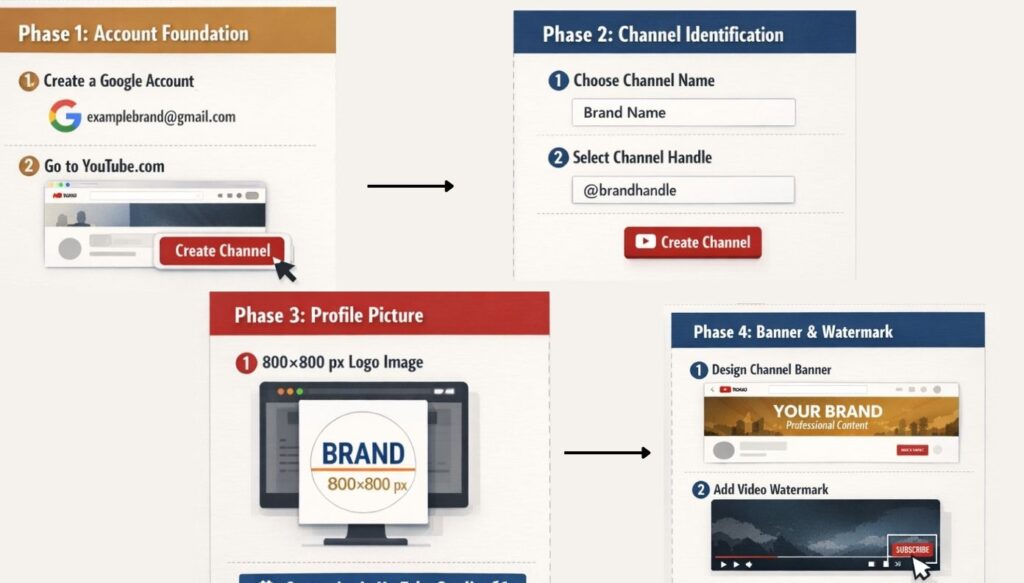
Phase I: Initial Account Foundation
The first requirement for establishing a YouTube presence is the creation of a Google account. This account serves as the central administrative hub for all YouTube-related activities.
Options exist to create a Google account for an individual or specifically for business management. For a brand-focused channel, an email address that reflects the brand name, such as one ending in ‘@gmail.com’, provides a cohesive starting point for the project.
Once the Google account is active, the process moves to the YouTube platform. Upon navigating to youtube.com, the administrator must initiate the channel creation process by selecting the option to “Create a channel.”
This action triggers the initial setup dialogue, which focuses on the primary identification markers of the channel.
Phase II: Channel Identification and Naming
The identification phase is critical for brand recognition and searchability. There are two primary identifiers to establish at this stage: the Channel Name and the Handle.
- Channel Name Selection: The name must accurately reflect the brand or business. Consistency with the official website or existing brand identity is recommended to ensure consumers can easily identify the official channel.
- Handle Assignment: The handle serves as a unique identifier for the channel on the platform. During the setup process, the availability of the desired handle is checked automatically.
If the handle is available, it becomes the primary means of tagging and identifying the channel within the YouTube ecosystem.
Phase III: Initial Visual Branding
Visual elements are essential for establishing brand authority from the moment a user visits the channel. The primary visual marker is the profile picture.
- Image Specifications: A recommended size for the channel profile picture is 800 by 800 pixels.
- Design Considerations: The image often uses an existing logo to maintain brand consistency. For a clean and professional appearance, a logo can be placed on a white background or on a background that matches the brand’s colour palette.
- Tools for Creation: Graphic design platforms like Canva.com are frequently used to create these assets. These tools provide templates for YouTube-specific designs, allowing for the precise adjustment of dimensions and outlines to match the brand logo.
Upon completing the name, handle, and profile picture upload, selecting “Create Channel” finalizes the initial birth of the channel.
If the channel does not immediately appear on the screen, the user interface allows for manual navigation to the channel view by clicking on the account icon.
Phase IV: Navigation to YouTube Studio and Customization
Advanced configuration occurs within the YouTube Studio environment. This interface is accessed by selecting the “Customise Channel” button on the main channel page.
Upon entering the studio, a welcome prompt typically appears, and the administrator must click “Continue” to access the full suite of customization tools.
The customisation section is divided into several tabs, with the initial focus placed on Branding and Basic Info rather than Layout, as layout adjustments typically require existing video content to be effective.
Phase V: Advanced Branding Assets
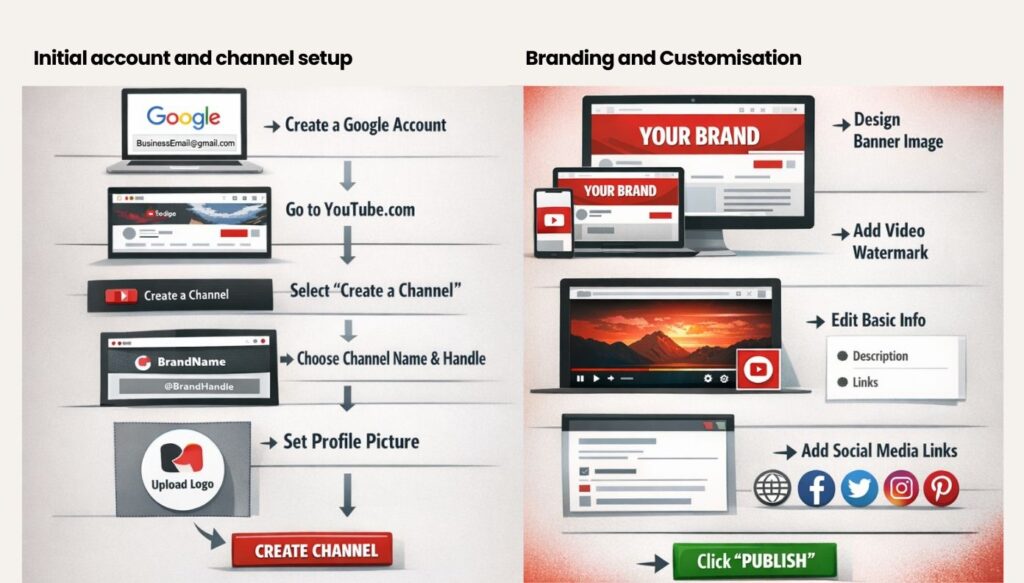
The Branding tab houses the tools necessary for further visual refinement, specifically the banner image and the video watermark.
1. The Banner Image
The banner image is the most prominent visual element on the channel homepage. It requires careful design because it must remain functional and aesthetically pleasing across a variety of hardware.
- Multi-Device Compatibility: The YouTube interface provides a preview showing how the banner will be viewable on TV, viewable on desktop, and viewable on all devices.
- Optimisation Strategy: The goal is to select an image that looks appropriate regardless of the screen size.
For example, a pattern or a series of relevant objects can provide a consistent look across different aspect ratios. The administrator has the ability to move the image slightly during the upload process to ensure the most important elements are visible on all devices.
2. The Video Watermark
The video watermark is a functional branding tool that appears in the bottom right-hand corner of the video player.
Its primary purpose is to provide a persistent opportunity for viewers to subscribe to the channel.
- Technical Requirements: The recommended dimensions for a watermark are 150 by 150 pixels. The file should be in a PNG or JPEG format.
- Display Settings: YouTube allows for customization of when the watermark appears. Options include the entire video, a custom start time, or the end of the video.
A common strategy is to set a custom start time of five seconds, ensuring the watermark appears shortly after the video begins.
Phase VI: Basic Information and Metadata
The Basic Info tab is where the textual and navigational data for the channel is managed. This section is vital for both user experience and search engine optimization.
1. Channel Description
The description provides an overview of the brand’s purpose and the type of content viewers can expect.
- Character Constraints: YouTube permits a total of 1,000 characters for the channel description.
- Content Strategy: The initial description can be adapted from existing social media or website content, though creating a unique, YouTube-specific description over time is beneficial.
- Multilingual Support: There is an option to provide the description in different languages, allowing the brand to reach a more diverse global audience.
2. Channel URL
The system provides a standard channel URL that includes a unique channel ID.
This specific web address is permanent and will not change, making it a reliable link for external marketing and cross-platform promotion.
3. External Link Integration
To drive traffic back to a brand’s primary digital properties, the “Links” section must be utilised. This allows the integration of the official website and various social media profiles.
- Supported Platforms: Links can be added for platforms such as Facebook, Twitter (X), Pinterest, and Instagram.
- Visibility: These links are prominently displayed in the channel’s “About” section and can also appear as icons on the channel banner at the top of the home page.
Phase VII: Finalization and Launch
Once all branding assets are uploaded and the basic information is populated, the administrator must click “Publish” to commit the changes to the live channel. At this stage, the channel is technically ready to receive content.
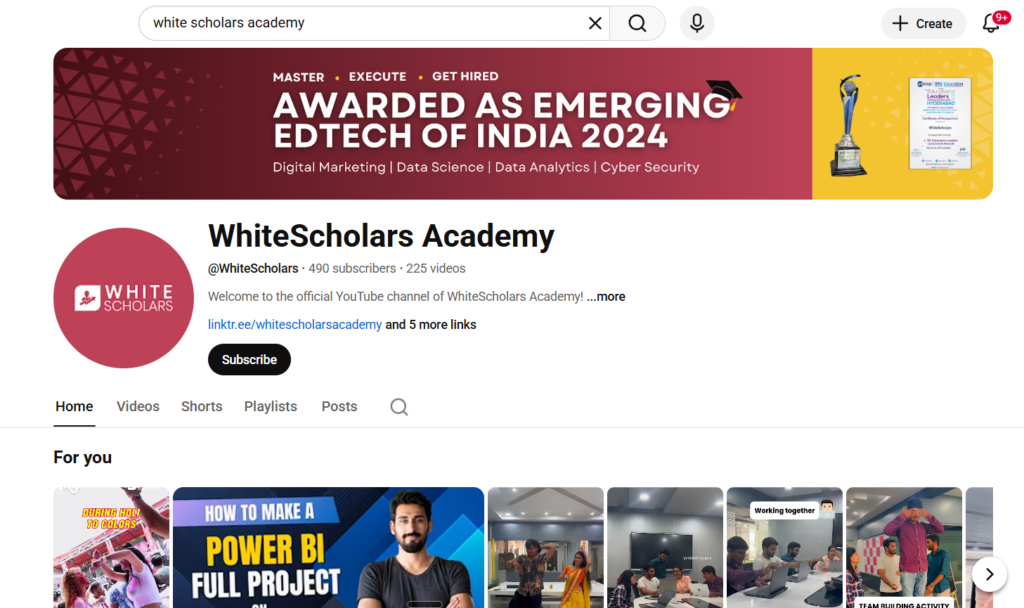
The “About” section will now reflect the newly added description and social links. While the “Home” page will initially appear empty without uploaded videos or created playlists, the foundational structure is complete.
As shown in the above figure, complete the process of establishing a YouTube channel through all the phases. To understand how to maintain a successful channel, enroll in WhiteScholars’ digital marketing course in Hyderabad powered by AI.
Phase VIII: Post-Creation Considerations
The establishment of the channel is only the beginning of the brand’s YouTube journey. As the channel moves from a setup phase to an operational phase, we must address several factors:
- Content Creation: The immediate priority following channel setup is the production and uploading of videos.
- Channel Optimisation: As content is added, the channel should be further optimised by creating playlists that organise videos into logical categories for the audience.
- Monetisation: While it is a goal for many, revenue generation should not be the primary focus during the initial setup.
Focus must remain on basic channel health, view counts, and meeting the platform’s specific eligibility thresholds through consistent content delivery.
- Iterative Branding: Visual elements like the profile picture or the watermark are not permanent and can be updated as the brand evolves or as the administrator refines the channel’s aesthetic.
By adhering to these steps, a brand ensures that its YouTube channel is professionally configured, visually cohesive, and technically integrated with its broader digital footprint.
The transition from a new account to a fully functional brand channel is a process of systematic configuration followed by the continuous addition of value through video content.
Conclusion
Establishing a YouTube brand channel involves a systematic process of creating a Google account, defining unique identifiers like handles, and implementing visual branding assets.
We maintain consistency across digital platforms by using official logos and integrating external links to websites and social media profiles. While the initial setup provides a professional foundation, you will achieve long-term success through consistent content creation and viewer engagement.
Monetization remains a secondary concern until we meet specific platform thresholds through active video production and audience growth. Ultimately, a well-configured channel serves as a central hub for a brand’s digital presence on the platform.
Frequently Asked Questions
1. What are the recommended dimensions and formats for channel branding images?
Profile pictures are recommended at 800 by 800 pixels, while video watermarks should be 150 by 150 pixels. These assets should be saved in PNG or JPEG formats to ensure visual quality across various viewing devices.
2. When is the appropriate time to focus on channel monetisation?
Attention to monetisation is unnecessary until a channel begins uploading content and generating consistent views. Meeting platform-specific thresholds is a prerequisite for revenue generation, making content quality and playlist organisation the initial priorities.
3. How does a channel handle differ from a channel name?
The channel name acts as the public title of the brand, whereas the handle is a unique identifier used for tagging and direct links. Handles must be verified for availability during setup to ensure the brand maintains a distinct and searchable identity.
4. What is the purpose of the standard channel URL?
A standard channel URL is a permanent web address that incorporates a unique ID specific to that account. This URL remains constant regardless of future branding changes, providing a stable link for marketing materials and external site integration.
5. How can other digital properties be integrated into the YouTube channel?
Official websites and social media profiles are added through the “Links” section in the Basic Info tab. These links are displayed in the channel’s “About” section and can be configured to appear as icons on the top banner.
