

Mastering SEOquake: The Ultimate Guide to Instant SEO Insights

Below is a comprehensive blog post detailing what SEOquake is, its core features, and how it transforms digital marketing efforts.
Introduction
SEOquake is a powerful SEO checker tool designed to provide a detailed SEO score for any webpage instantly.
Instead of requiring digital marketers to check every landing page individually, SEOquake streamlines the process by delivering key data directly from the Search Engine Results Pages (SERPs).
By using this tool, marketers can move away from manual digging and guesswork, gaining instant insights to power their SEO strategies.
In the fast-paced world of digital marketing, data is the most valuable currency. However, manually gathering that data from dozens of competitor pages and your own site can be a time-consuming bottleneck.
This is where SEOquake becomes an essential part of a marketer’s toolkit. By providing a “one-click” solution for page and domain analysis, it bridges the gap between raw search results and actionable strategy.
What is SEOquake?
At its core, SEOquake is a versatile browser extension (and part of the Semrush ecosystem) that allows you to analyse and optimise web pages with ease.
It is specifically designed to provide high-level metrics without requiring you to leave your browser or navigate deep into complex software dashboards.

Whether you are performing a quick SEO audit or a deep dive into competitor strategies, SEOquake serves as a diagnostic hub for your browser.
Key Features of SEOquake
SEOquake provides several distinct tools that cater to various aspects of digital marketing and search engine optimisation.
1. SERP Overlay
One of the most popular features is the SERP Overlay.
This tool displays SEO metrics directly within the Google search results for every listing. This allows you to compare the authority and strength of multiple websites at a glance without having to click on each result.
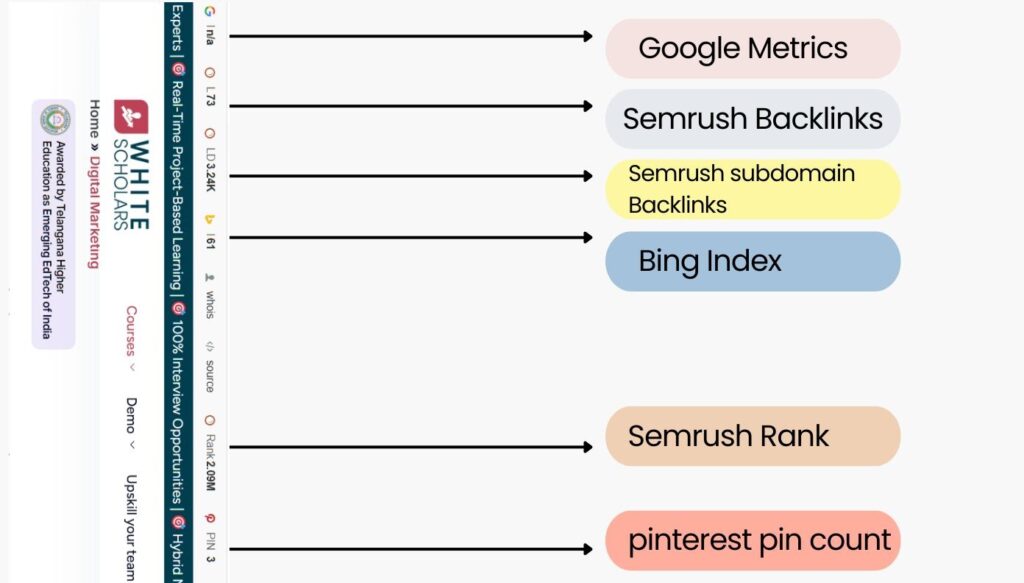
2. Domain and Page Metrics
SEOquake provides a snapshot of a site’s standing in the digital landscape. Key metrics delivered include the following:
- Google Index: The number of pages from that domain currently indexed by Google.
- Alexa Rank: A measure of the site’s popularity relative to other sites (Note: Although Amazon has retired Alexa Rank, it is still listed as a core metric provided by the tool.)
- Semrush Data: Integration with Semrush offers in-depth insights into the site’s traffic and keyword profile.
3. Instant SEO Audit
Technical SEO is often the foundation of search success. SEOquake includes an SEO audit tool that helps you spot technical issues instantly.
By running a page diagnostic, you can identify why a page might be underperforming and get a clear picture of its technical health.

4. Keyword Density Report
Understanding how competitors use keywords is vital for content strategy.
The Keyword Density Report allows you to analyse how frequently specific terms appear on a page, helping you uncover the keyword strategies your rivals are using to rank.
5. Internal and External Link Analysis
Links are the backbone of SEO. SEOquake provides detailed reports on internal and external linking patterns.
This helps marketers uncover potential partnerships and understand the site architecture of their competitors.
How SEOquake Helps in Digital Marketing
Accelerated Competitor Analysis
The sources highlight that SEOquake helps you outrank your rivals in the SERPs.
Instead of manually visiting every competitor’s page, the SERP overlay and density reports give you a “bird’s-eye view” of their strengths and weaknesses immediately.
Streamlined Technical Health Checks
For digital marketers managing multiple clients or large sites, the ability to “spot technical issues instantly” is a massive time-saver.
This tool allows for quick checks on on-page SEO elements like meta tags, headers, and link health without needing a full-scale site crawl every time.
Data-Driven Strategy
By moving away from “guesswork” and “manual digging”, SEOquake provides the instant insights necessary to power a modern SEO strategy.
Whether you are working on content marketing, link building, or technical SEO, having immediate access to index data and link patterns ensures your decisions are based on current search reality.
Getting Started: Configuration and Troubleshooting
To get the most from the tool, set it up correctly through its configuration settings.
While the tool is designed for ease of use, there are also dedicated resources for troubleshooting common issues to ensure your data stream remains uninterrupted.
How to Use SEOquake for Content Strategy
Beyond just looking at metrics, a marketer can use the keyword density feature to find “content gaps”.
If a competitor is ranking for a high-value term but their keyword density is low or their technical audit shows weaknesses, that represents an opportunity for you to create a better-optimised page.
The Power of the Extension in Outreach
When performing link-building outreach, the domain metrics are invaluable. Instead of reaching out to every site in a niche, you can use SEOquake to quickly vet the ‘Authority’ of a potential partner.
If their Google Index is low or their Semrush metrics show a decline in traffic, you might decide to prioritise other prospects, saving your outreach team hours of wasted effort.
Why Real-Time Data Matters
SEO is not static. A site that was a leader six months ago might have fallen off due to a Google algorithm update or technical errors.
Because SEOquake pulls data straight from the SERPs, it provides a more current snapshot than many cached databases, allowing digital marketers to react to shifts in the market in real-time.
To understand more about SEOquake and work on real-time data, enrol in the best digital marketing course in Hyderabad powered by AI from WhiteScholars.
Summary of Key Tools within SEOquake
| Tool | Primary Function |
| SERP Overlay | See metrics directly in search results. |
| SEO Audit | Identify technical SEO “blockers” instantly. |
| Keyword Density | Break down the content strategy of any page. |
| Link Analysis | Examine internal and external linking structures. |
| Parameters | Customise the specific data points you want to see. |
By integrating SEOquake into your daily routine, you can ensure that every search you perform becomes a mini-audit, keeping you one step ahead of the competition.
Conclusion
SEOquake is a powerful tool that eliminates manual digging by delivering key data directly from search results. It provides instant SEO audits, domain metrics, and link analysis to help digital marketers outrank their rivals.
Users can analyse keyword density and technical issues with a single click, streamlining their overall SEO strategy. The tool integrates Semrush data and Google Index metrics to offer a comprehensive view of website authority.
Overall, it is an essential resource for those seeking fast, data-driven insights to effectively optimise their web pages.
Frequently Asked Questions
1. What is SEOquake and how does it work?
SEOquake is a browser-based SEO checker that provides a detailed SEO score and key metrics for any webpage instantly. It allows marketers to gather data from the SERPs without needing to check every landing page individually.
2. What specific metrics can I see with SEOquake?
It delivers essential data, including Google Index numbers, Alexa Rank, and Semrush-driven domain and page metrics. It also provides detailed reports on keyword density and internal and external linking patterns.
3. How does the SEO audit feature help my website?
The SEO audit tool allows users to spot technical issues instantly by running a diagnostic check on a specific page. This helps identify specific “blockers” that might be preventing a website from ranking higher in search results.
4. Can I see SEO data directly on Google Search?
Yes, the SERP overlay feature allows you to see SEO metrics directly within Google search results for every listing. This enables a quick comparison of website authority and competitor performance as you browse.
5. What should I do if the tool is not working correctly?
SEO quake provides a specific troubleshooting guide that covers common issues and how to fix them. Additionally, use the configuration guide to set up the tool correctly and get the most out of its features.
